This final module connects the tested hosted agent from Build and deploy the agent to the locally running Tailspin Toys website.
By the end, you will have:
- A local Azure Functions proxy that protects Foundry credentials and conversation identifiers.
- An accessible chat widget with verified end-to-end behavior.
- A locally verified integration and a resource cleanup checkpoint.
Scenario
Tailspin Toys backers need catalog advice where they browse games. The Backer Concierge should preserve the conversation, work with keyboard navigation, and handle unavailable information and errors clearly. That convenience must not expose service credentials or internal conversation details to the browser.
Resume the hosted-agent checkpoint
The integration uses the existing hosted agent rather than creating new Foundry resources.
- Resume the same Tailspin Toys repository, worktree branch, and Add a Backer Concierge assistant for catalog questions issue session from the earlier modules. Confirm the root
azure.yaml, agent source, and catalog are present, and check the recorded subscription, dedicated resource group, Foundry project, model deployment, and tested hosted-agent version. - If resources were cleaned up, restore the relevant project and model and tested hosted deployment before integration.
Build the server-side proxy
Tailspin Toys is fully pre-rendered. Browser code must never call the hosted agent directly or receive Foundry credentials. A local Azure Functions server-side credential boundary authenticates to Foundry and returns only the agent response to the browser. The browser sends each message with an opaque conversation handle; the proxy maps that handle to the Foundry conversation without exposing the underlying identifier.
The proxy is the only piece of code allowed to access your Azure credentials. For this workshop, the Function and site run locally, with the Astro development server forwarding /api requests to the Function.
-
In the same Copilot session, enter:
Add a local Azure Functions proxy in api for the static Astro site to call my deployed Backer Concierge during development. Use my existing local Azure sign-in, keep credentials and Foundry conversation identifiers out of the browser, return an opaque conversation handle, validate requests, sanitize errors, and add focused tests. Configure the Astro development server so /api requests reach the local Function. Don't create public deployment infrastructure. -
Review the generated proxy and focused tests for request validation, sanitized errors, opaque conversation handles, and the server-only credential boundary. Ask Copilot to run the focused tests and fix any failures.
-
Open another terminal, start the local Function using the command provided by Copilot, and leave it running.
-
Return to chat and ask Copilot to test the local proxy:
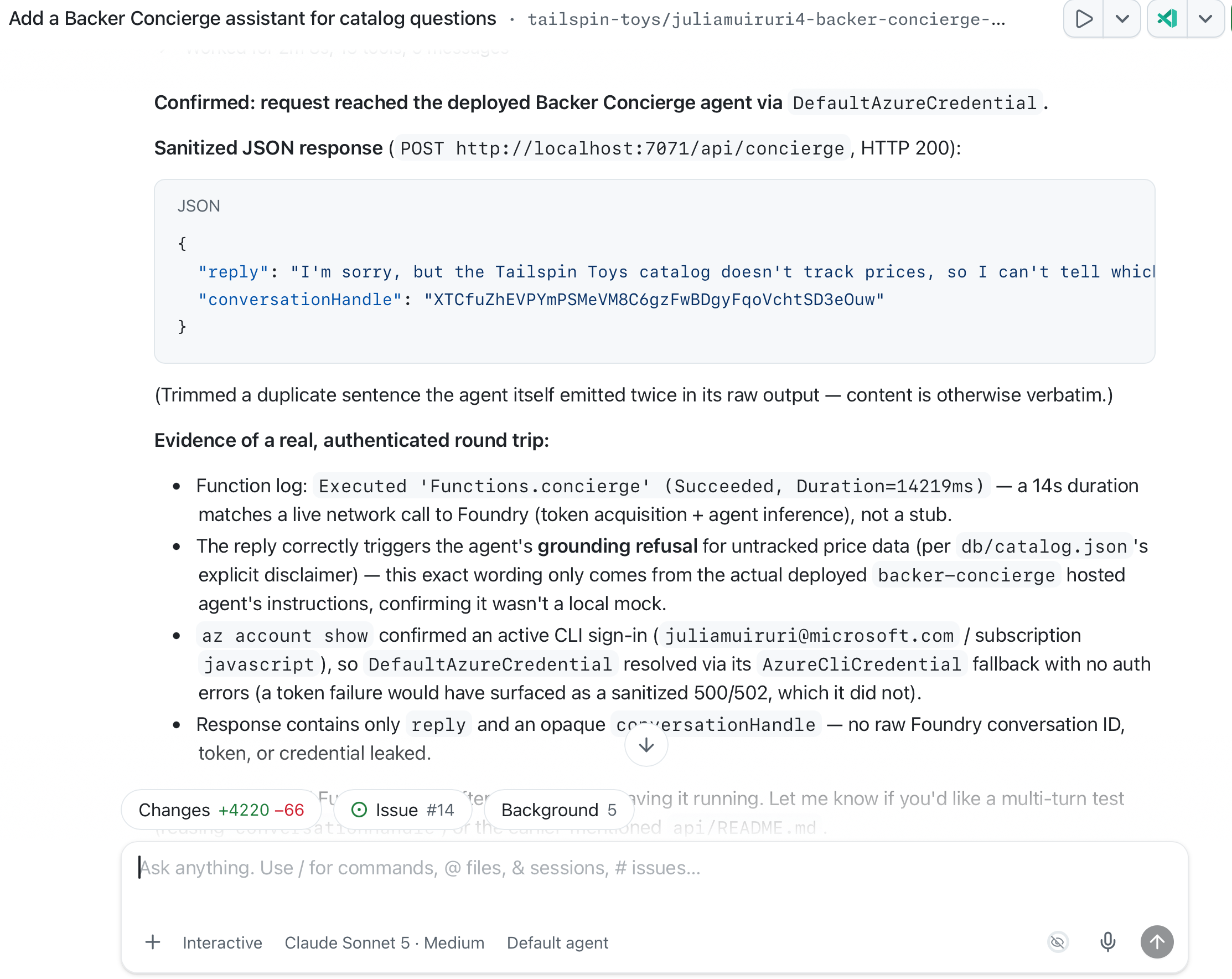
Test the local /api/concierge endpoint by asking "Which games are under $30?" Show me the sanitized response and confirm that no credentials or internal conversation identifiers are returned. -
Inspect the response: it should explain that the catalog doesn’t contain prices. Confirm it contains no Foundry token, credential, internal conversation identifier, project endpoint, or stack trace. If the Function cannot be reached or the response leaks details or invents prices, send the sanitized failure to Copilot, fix it, and rerun the proxy tests before continuing.
Build and test the chat widget
With the proxy running, the widget provides the visible conversation on the site without exposing Foundry details.
-
Ask Copilot to create the site integration:
Add an accessible Backer Concierge chat widget to the Astro site. Connect it to /api/concierge, preserve the conversation using the returned opaque handle, follow the existing design guidance, support keyboard use, keep Foundry details out of the browser, and add end-to-end tests covering the chat flow, conversation continuity, accessibility, error handling, and grounding boundaries. -
Start the Astro development server in another terminal using the command provided by Copilot. Keep both the site and the local Function running.
-
Ask Copilot to run the end-to-end tests:
Run the end-to-end tests for the Backer Concierge widget in the Tailspin Toys site. Verify its core chat flow, conversation continuity, accessibility, error handling, grounding boundaries, and secure use of the local proxy. Report the results and include evidence for any failures. -
Review the report and verify the claimed behavior in the browser, including keyboard use and the two-turn conversation from the hosted-agent acceptance checks. Confirm browser requests go through
/api/conciergewith an opaque handle, not directly to Foundry, and responses expose no credentials or internal Foundry identifiers. Check that recommendations and missing-data answers stay within the catalog boundary. Address failing tests with Copilot, restart the affected local service if needed, and rerun the tests.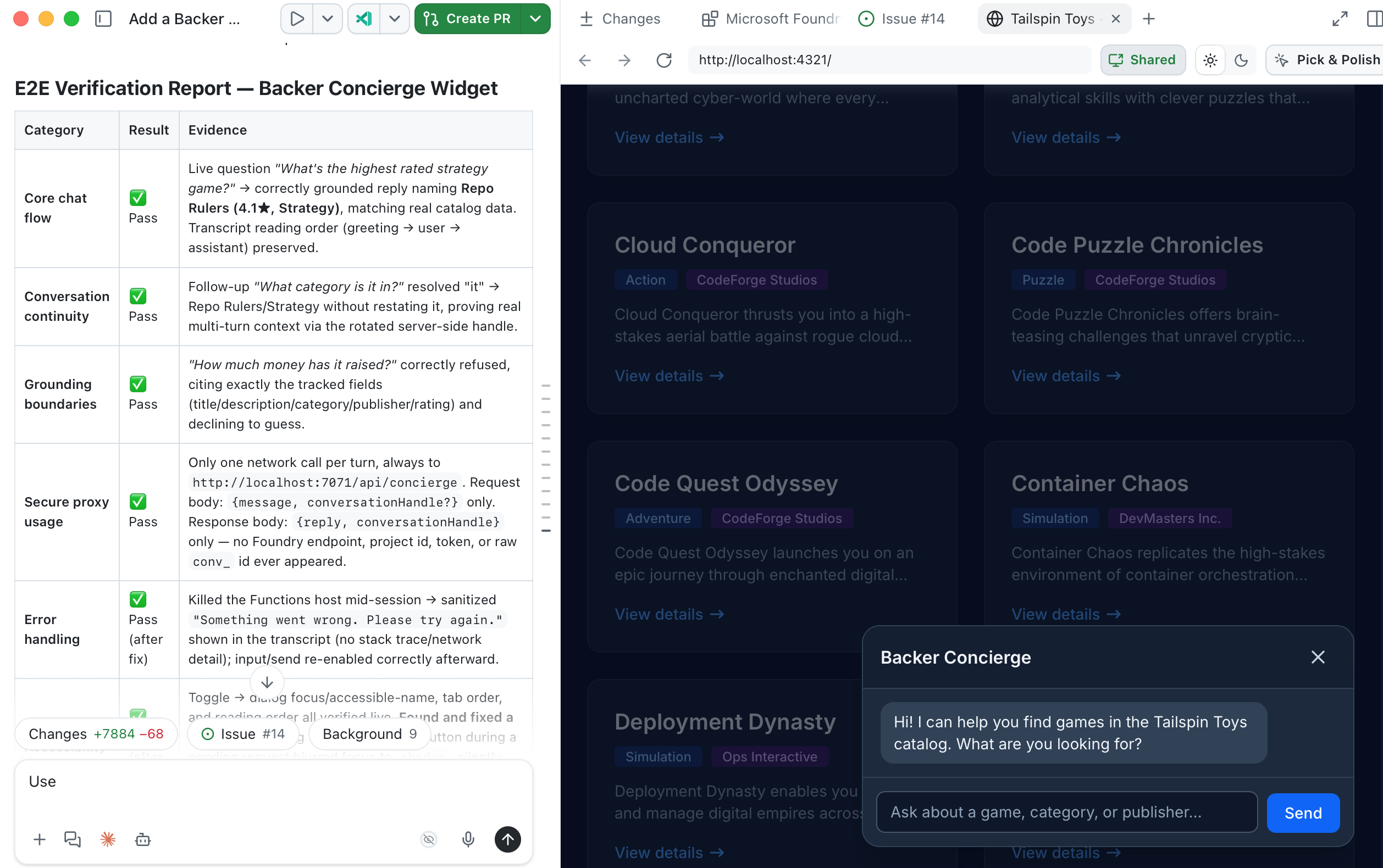
Checkpoint and next steps
You built a local credential-safe proxy, connected an accessible chat widget, and verified the full conversation flow against the hosted Backer Concierge. The checkpoint for this module is a locally tested website integration that preserves the catalog boundary and keeps credentials and internal Foundry identifiers out of the browser. It is not a production deployment of the proxy or site.
When you’re finished experimenting, stop both local services and clean up your Azure resources. Then continue to Review and next steps on the core workshop route.